Files and transfers
Put a different storage location in each pane. Use the file actions or drag a sample file into the other pane, then open Transfers.

Web / Docker · Self-hosted server
Deploy ByteBridge Web with Docker Compose to browse storage, run transfers, open SSH sessions, and manage containers from your browser.
01 / INSTALL · WEB 0.11.127
Use the release for your Linux host’s CPU architecture, outside a Git checkout. Install Docker Engine with BuildKit and the Compose v2 plugin. The portable bundle includes its precompiled runtime; it needs no host Python or launcher.
docker version
docker compose versionFrom the extracted release directory, start the services and follow the logs. Web normally opens at http://SERVER-IP:5151 on your trusted setup network. The container listens on port 8080.
docker compose up -d
docker compose logs -fGet the private claim key, enter it in the browser and create your administrator. The key is never printed in service logs. Alternatively, use the interactive terminal setup command.
docker compose exec bytebridge bb setup-key
# Alternative: interactive administrator creation
docker compose exec bytebridge bb setupStep 2 is required. Choose ByteBridge-managed Tailscale, an existing HTTPS route, or explicitly save a Trusted LAN (HTTP) address. For HTTPS, open Continue on https://…, sign in there, choose Verify this HTTPS connection and Save verified address, then Continue in that HTTPS tab. An HTTP tab cannot complete HTTPS setup.
Managed Tailscale creates a separate tailnet device directly from the browser. Host Tailscale is optional. See the remote access walkthrough. LAN HTTP is for trusted browser access; Android pairing and native mounts require trusted HTTPS.
Add SFTP, SMB, Dropbox or OneDrive in Connections. Verify a new SFTP host fingerprint, retest, and copy a small file. Import a signed server license to enable its Android and Desktop client features, or continue using free Web. Pair Android and grant connection relay access explicitly.
02 / FIRST WORKFLOWS
Put a different storage location in each pane. Use the file actions or drag a sample file into the other pane, then open Transfers.
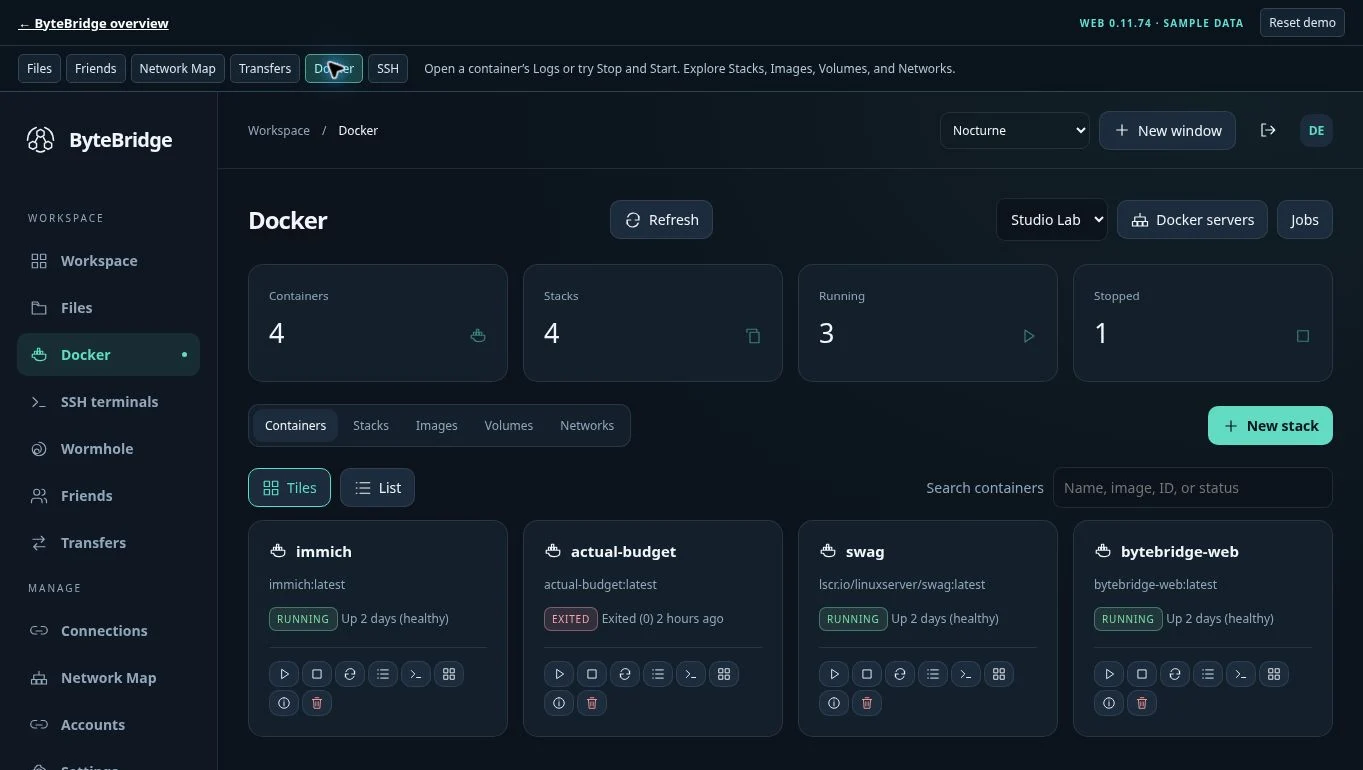
Administrators can inspect containers, logs, stacks, images, networks, and volumes when Docker management is configured. Add an SSH profile to open a terminal session.
Pair selected Android folders or open this server from ByteBridge Desktop. Use a trusted HTTPS address reachable from the client.
Select a text file and choose Open in Code Editor. If you use the extension, Open in VS Code hands off an authorized location.
03 / CONNECTED WORKFLOWS
Use Network Map to see linked instances and reported routes. Run Check routes for fresh route evidence from participating endpoints. Configure connection access separately in Connections.
Go to Transfers → Automation rules → New rule. Choose an authorized source and destination, set a collision policy, and run the rule manually once before scheduling it. Check the rule’s history for the result.
Friends runs inside ByteBridge Web. In Friends → Friends → Pair by host address, use the other Web instance’s reachable HTTPS address. Either person can use the optional six-digit verification step over a trusted channel. Send one file from Outbox and track progress while the two hosts stage it. The recipient chooses where to save it from Inbox.
Administrators can adjust file size and sandbox quota in Settings → Friends transfer limits or Friends → Transfer limits. When an offer exceeds either limit, the sender sees the refusal in Outbox and the recipient gets an in-app notice.
04 / OPERATE
For clients on another device, use a reachable LAN, VPN, or reverse-proxy address. Use trusted HTTPS for remote access. A reverse proxy can forward to the host’s published port or to port 8080 on a shared Docker network. Keep the root URL consistent across Desktop, Android pairing, and VS Code.
In the portable release, open Docker → Docker setup, test the connection, review host-control permission, confirm and enable Docker management. Its isolated helper owns the host socket and the Web service uses the approved private channel. Disable it from the same screen. Phone and linked-server permissions remain separate.
Before upgrading, back up configuration, database and vault together, files, private host identity, latest license checkpoint and network state. Extract the matching new release, retain the original project and state, then run docker compose up -d. Keep custom proxy settings. The advanced Python launcher remains available for existing managed deployments and requires Python 3.11+.
docker compose ps
docker compose logs --tail=100
docker compose exec bytebridge bb info
05 / COMMON ISSUES
Install the Compose v2 plugin for your Docker installation and confirm that docker compose version works before rerunning setup.
Check the bind address, firewall, and route from the phone. 127.0.0.1 refers to the device running the browser. Open the reachable host address or reverse-proxy hostname from the phone.
The native folder picker requires a supported desktop Chromium browser and a secure context, usually HTTPS or loopback on the same computer. Docker Shared Files come from the server-side file root.
KEEP GOING